 Franck Saliou
2026
DocumentationDu Jeudi 1er janvier au Dimanche 4 janvier
- Vacances de fêtes de fin d'années
Lundi 5 janvier
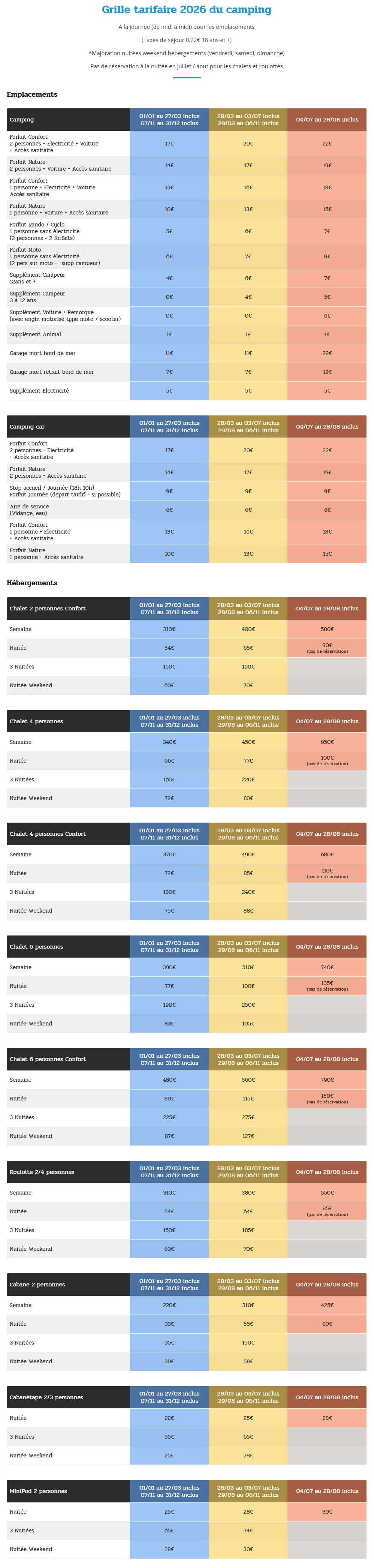
- Camping Locquirec : Mise à jour des tarifs du camping
Mardi 6 janvier
- Audivit : Décision d'établir une interface intermédiaire en PHP pour modifier import / export CSV
- LinkedIn : Mise à jour du profil

Mercredi 7 janvier
- Organisation : Mise en place de https://preuves-de-teletravail.francksaliou.com
Jeudi 8 janvier
- Audivit : Template formulaire PHP CSV avec Docker Desktop / Pimp
- Camping Locquirec : Edition de facture
- Organisation : Mise en place thumbnail cliquable sur preuves-de-teletravail
html
<img src="image.jpg" class="img-thumbnail"
     style="max-width:200px;cursor:pointer"
     data-bs-toggle="modal"
     data-bs-target="#imageModal"
     data-bs-img="image.jpg">

<div class="modal fade" id="imageModal" tabindex="-1">
  <div class="modal-dialog modal-dialog-centered modal-lg">
    <div class="modal-content">
      <img id="modalImg" class="img-fluid rounded">
    </div>
  </div>
</div>
javascript
document.addEventListener('click', function(e) {
  if (e.target.hasAttribute('data-bs-img')) {
    document.getElementById('modalImg').src = e.target.getAttribute('data-bs-img');
  }
});
This is the second item's accordion body. It is hidden by default, until the collapse plugin adds the appropriate classes that we use to style each element. These classes control the overall appearance, as well as the showing and hiding via CSS transitions. You can modify any of this with custom CSS or overriding our default variables. It's also worth noting that just about any HTML can go within the
.accordion-body, though the transition does limit overflow.
This is the third item's accordion body. It is hidden by default, until the collapse plugin adds the appropriate classes that we use to style each element. These classes control the overall appearance, as well as the showing and hiding via CSS transitions. You can modify any of this with custom CSS or overriding our default variables. It's also worth noting that just about any HTML can go within the
.accordion-body, though the transition does limit overflow.